Docs / Features
Scheduled tasks
Jobs the agent runs by itself every day, every week or every few hours, and reports back on.
You can ask Harnes Code to do something regularly on its own — a price report every morning, a weekly site backup, checking for new listings.
Create one
Just say it in the chat:
Example request
Every day at 9 am get the iPhone 16 price from Torob and Digikala and append it to the “Prices” sheet.
Example request
Every Friday at 3 am back up the site on cPanel and put it in Google Drive.
The agent creates the schedule and confirms when it will run. Times are always Tehran time.
Schedule types:
- Daily: every day at a set time
- Weekly: on chosen weekdays
- Repeating: every N minutes or hours (at least 15 minutes)
- Once: at a specific moment
Manage
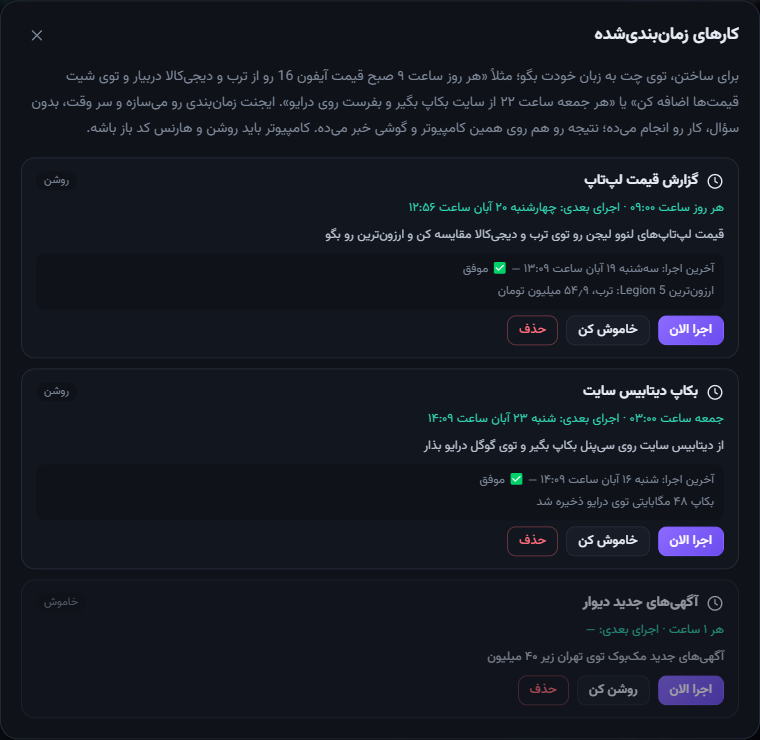
Settings → Scheduled tasks lists them all: next run, last result, and Run now, On/Off and Delete. You can also say it in chat, e.g. “move the price report to 8 am”.
What happens on a run?
- A new chat marked ⏰ is created showing exactly what the agent did.
- The result arrives as a notification on Windows and on your phone.
- If a step needs approval and you don’t answer within 30 minutes, that step is declined.
Note: the PC must be on with Harnes Code open. If it was off at run time, the missed job runs when you turn it on within 6 hours.