Modes, approvals and safety
When the agent works on its own and when it asks you first; automatic backups and the Undo button.
Harnes Code works on your own computer, so you decide how far it goes on its own. Switch the mode from the top bar (next to the model name) or in Settings.
“Auto” mode (recommended)
Inside the project folder everything is automatic: creating, editing and deleting files, running npm and python, installing apps with winget, starting servers and even connecting to your servers over ssh.
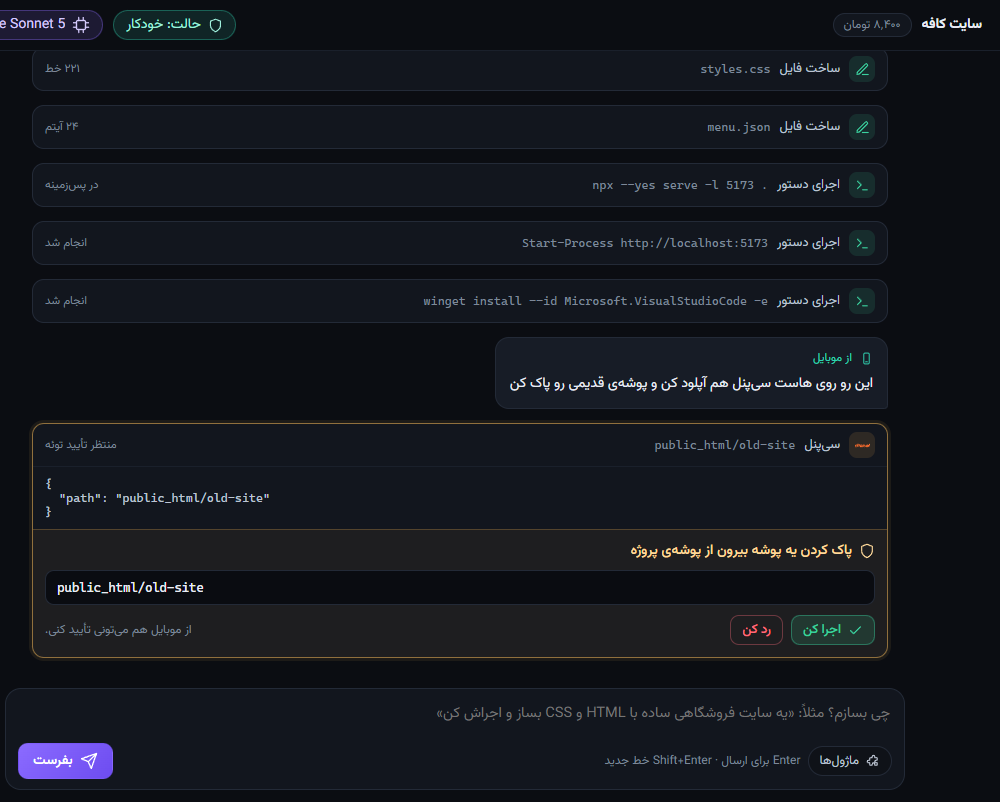
Only genuinely sensitive actions show a Run / Decline button, such as:
- deleting or moving something outside the project folder
- uninstalling software, disk and boot changes, shutdown and restart
- turning off antivirus or the firewall, changing Windows accounts
- writing to the system registry (HKLM)
- running a script straight from the internet
- dangerous commands on other servers (rebooting a server, dropping a database…)
“Ask” mode
Asks before every file change and every command; only reading is free. Slower, but you are in full control.
Approve from your phone
When the agent is waiting for you, the request also appears on your phone and you can approve or decline it there. Declining ends that turn and the agent asks you what to do instead.
Backups and Undo
In both modes a backup copy is saved before any file is changed, and each turn ends with an Undo button that restores every file from that turn.
Where are service logins stored?
Passwords and tokens you enter in Modules are kept only on this computer, encrypted with Windows DPAPI, and are never sent to our server or to the model.